README File Formats
All the files mentioned here (except Environment) are stored into a directory named data in the installation folder, which is created at runtime. The directory data is structured as follows:
data
Default: The directory of the default profile, automatically created.
input: This directory contains the input files, as mentioned in section Input files. This directory is typically created when a file is uploaded.output: This directory contains all the output created by processing the input files.
YYYYMMDD-hhmmss: Created with the timestamp of each run of processing the input files. This directory contains the created PDF files and a protocol, as mentioned in section Output files. Remark: You may want to delete these output files from time to time, even if there's a simple automatism (see maxRunsToKeep in Environment) that cleans up these files.Default: A profile directory is created when the user creates a new profile, and deleted when the user deletes a profile.This JSON file contains the environment to define some global variables, is located in the configuration directory (cfg/) and holds the following items:
| Name | Description | Range | Default value |
|---|---|---|---|
maxRunsToKeep |
maximum numbers of runs to keep (per profile) | int | 10 |
currentProfile |
name of the currently selected profile, changed by selecting a profile via the web interface | string containing a name that is used as directory name | Default |
There is currently no UI to set maxRunsToKeep, you have to edit this JSON file. The automatism that uses this setting runs after every processing and cleans up the old runs of the current profile. Therefore, you should never have more runs per profile than this setting; except the last run was a test run, as test runs do not count; old test runs are deleted anyway and are not kept.
{
    "maxRunsToKeep": 10,
    "currentProfile": "Default"
}All files belonging to a profile are stored inside the directory data/[profile name], where [profile name] is the current value of the variable currentProfile in the Environment.
The profile configuration controls the processing and is editable via the web interface. The setting is stored into the JSON file ProfileConfiguration.json, located in the profile directory (data/[profile name]), and holds the following items:
| Name | Description | Range | Default value |
|---|---|---|---|
currency |
currency | "CHF" or "EUR" | "CHF" |
printAmount |
controls whether an amount is printed and if yes which amount is printed | "noAmount"= no amount is printed, "globalAmount" = amount of this environment is printed or "individualAmount" = the individual amount in the recipient entry is printed |
"noAmount" |
amount |
amount that is taken if printAmount is "globalAmount" |
numeric, >= 0.00 |
0.00 |
addDebtor |
controls whether the field 'UltimateDebtor' ('Zahlbar durch') is set in the QR bill (from the data found in the recipient, see Recipients.csv | boolean value, "0" = false, "1" = true |
"0" |
addRefToAddInfo |
controls whether the reference is appended to the field 'AdditionalInformation' | boolean value, "0" = false, "1" = true |
"0" |
createPdf |
controls whether PDFs are created | boolean value, "0" = false, "1" = true |
"1" |
printPaymentSlip |
controls whether the payment slip is printed | boolean value, "0" = false, "1" = true |
"1" |
sendMail |
controls whether e-mails are sent | boolean value, "0" = false, "1" = true |
"1" |
sleepAfterSend |
time to sleep after a mail has been sent | numeric value, microseconds | 1000000 (1 million) for 1 second |
presetMail |
presets a test e-mail address | string containing an e-mail address | "" (empty) |
multiLanguage |
controls whether multi-language is activated | boolean value, "0" = false, "1" = true |
"0" |
defaultLanguage |
default language used if recipient's language is not supported | MANDATORY: One of "de", "fr", "it" or "en" |
"en" |
additionalLanguages |
additional languages to default language (only used if multiLanguage is true) | One of "de", "fr", "it" or "en", must not have the same value as defaultLanguage. |
[] (empty) |
Remarks:
addRefToAddInfo is set to true then the reference (see Recipients.csv) is not only written to the field 'PaymentReference' ('Referenz') of the payment slip but appended as well to the field 'AdditionalInformation' ('Zusätzliche Informationen') of the payment slip. If the optional AdditionalInformation.json is present then the reference is appended after a line break to this additional information; if there is no additional information then the reference is used as additional information.createPdfis set to false then no QR bill PDFs are created, only mails are sent (without the QR bill attachment); the QR bill processor acts in fact as a simple mass mailer.printPaymentSlip is set to false then the created PDF does not contain a payment slip; the QR bill processor acts in fact as a simple mass mailer with an attached personalized PDF. Possibly useful to send a letter of thanks after you have received a donation.sendMail is set to false then no mails are sent, only the QR bill PDFs are created (important to control whether the PDF creation is as wanted, without sending mails to everybody ...)createPdf and sendMail are set to false then the QR bill processor will throw an error, as this makes no sense.sleepAfterSend is stored in microseconds as described above, but on the example web page, the user enters this value in tenths of seconds (10 for 1 second).sleepAfterSend carefully. Ask your web hoster, how many mails per second you are allowed to send without being blocked as spammer.presetMail lets you pre-configure an e-mail address for the Test run execution (but it may well be overwritten there).{
"currency": "CHF",
"printAmount": "noAmount",
"amount": "0.00",
"addDebtor": "0",
"addRefToAddInfo": "0",
"createPdf": "1",
"printPaymentSlip": "1",
"sendMail": "1",
"sleepAfterSend": 1000000,
"presetMail": "",
"defaultLanguage": "en",
"multiLanguage": "0",
"additionalLanguages": []
}Important: All files (.html, .json and .csv) need UTF-8 encoding!
All input files are stored in the input folder below the profile directory (see Profile) by the web interface.
For the typical usage as QR bill mass mailer, all the following files are mandatory (except the mail body HTML files and the PDF template files for the optional multi-language support and the anyway optional AdditionalInformation.json).
However, the files MailBody.html and MailData.json are not needed if the flag sendMail is set to false (just QR bills are created, but no mails are sent).
On the other side, the files AmountInformation.json, CreditorInformation.json, PdfData.json and PdfTemplate.pdf are not needed if the flag createPdf is set to false.
Therefore, only the file Recipients.csv is needed in every case.
You may wonder why there are so many different input files.
The reason is that the data in the input files have --apart from a different purpose-- a different life cycle.
CreditorInformation.json is typically set just once for an organization (probably only changed when the address or the IBAN of the creditor changes).
MailData.json, which contains the sender address and the subject of the e-mail, will also seldomly change.
The optional AdditionalInformation.json may change when the purpose of the bill changes, for example between "Donation" and "Membership fee", or it is not present at all for some usage scenarios.
MailBody.html, PdfData.json and PdfTemplate.pdf will probably change for every specific variant of bills.
Recipients.csv will change for every run of the QR bill processor.
Typically, you will maintain different sets of these files for different use cases. Use different profiles to achieve that!
The supported languages "de", "fr", "it" and "en" are hard-coded, as the underlying Swiss QR bill library (and the Swiss QR bill standard as well) do only support these four languages.
The JSON files support multiple languages on some fields; such a field contains the following sub keys:
"language": contains one of the following values:
"default": mandatory, default text in the configured defaultLanguage, more below.defaultLanguage, for example "en"."text": the text assigned to this language. The mail body (a HTML file) and PDF template files are treated specially, see MailBody.html and PdfTemplate.pdf.
The algorithm for the multi-language support works as follows: Any field is looked up with the language code found in the current recipient.
"default" is returned.Remark: During the 'Dry run' execution, a warning is issued if a recipient record contains a language that is not included in any field of an input file. In this case, the normal processing would take the default language without any further notice.
This file is ignored if the configuration flag sendMail is false (just QR bills are created, but no mails are sent).
It contains the information for sending the e-mail.
The surrounding key MailData contains the following fields:
| Name | Description | Range | Example |
|---|---|---|---|
fromAddress |
sender e-mail address | E-mail address | "hans@example.com" |
fromName |
sender name | String | "Hans Muster" |
subject |
subject | multi-language | "Friends of QR-Rechnung" |
attachmentName |
name of the attachment | multi-language | "QR-Rechnung" |
Remarks:
subject and attachmentName support Multi-language, but both should not contain umlauts, as this is not properly supported by e-mail clients.attachmentName is just the name without file extension .pdf (current date and file extension are appended by the code).attachmentName is optional if the configuration flag createPdf is false.without optional Multi-language support:
{
    "MailData":
    {
        "fromAddress": "hans@example.com",
        "fromName": "Hans Muster",
        "subject" : [
            {
                "language": "default",
                "text": "Friends of QR-Rechnung"
            }
        ],
        "attachmentName": [
            {
                "language": "default",
                "text": "QR-Rechnung"
            }
        ]
    }
}
with optional Multi-language support for "en" (defaultLanguage is "de"):
{
    "MailData":
    {
        "fromAddress": "hans@example.com",
        "fromName": "Hans Muster",
        "subject" : [
            {
                "language": "default",
                "text": "Friends of QR-Rechnung"
            },
            {
                "language": "en",
                "text": "Friends of QR bill"
            }
        ],
        "attachmentName": [
            {
                "language": "default",
                "text": "QR-Rechnung"
            },
            {
                "language": "en",
                "text": "QR-bill"
            }
        ]
    }
}This file is ignored if the configuration flag sendMail is false (just QR bills are created, but no mails are sent).
It contains the HTML message body for the e-mail sent with the created QR bill as attachment and is taken as is, except you have defined some placeholders.
The following placeholders are recognized:
| Placeholder | Processing |
|---|---|
{{greeting}} |
This placeholder is replaced by the value of the greeting in the recipient. If the greeting is not present in the recipient, the placeholder is replaced by an empty string. This makes sense, if you want to have a greeting for some recipients but not for other recipients. |
{{amount}} |
This placeholder is replaced by the value of the amount of the recipient. If the amount is not present in the recipient, this placeholder is not replaced, as replacing this placeholder by an empty string makes in the most cases no sense! |
In addition to the file MailBody.html, the code will look if there are files named MailBody_[language].html, for example MailBody_en.html for English.
See separate documentation in the directory examples. The usage of placeholders are shown in section A.2 - E-mail mass mailing with multi-language support
This file is ignored if the configuration flag createPdf is false (do not create QR bills, just send mails).
It contains positions, text attributes and texts for variable elements to be printed into the created PDF. You may add as many entries as you wish, but pay attention to the special entries.
If you don't like how this is done (and you are familiar with programming in PHP), you can easily implement your own method by changing the method process() in the PHP source file QrbPdfCustomizer.php.
The surrounding key PdfData contains a list of items with the following format:
| Name | Description | Range |
|---|---|---|
name |
Unique name | string |
position |
Position | see Position |
textAttribute |
Text attribute | see TextAttribute |
text |
Text | see Multi-language |
Remarks:
name is mandatory.position is mandatory except for the special entry default.textAttribute is mandatory only for the special entry default.text is mandatory except for the special fields default, address and amount (see below). This field supports Multi-language.defaultThis entry holds the default text attribute that is taken if some other field does not define a text attribute. This entry has neither a position nor a text.
addressThis entry does not have a text, but holds the start position and (optionally) the text attribute for the address, which is taken from the recipient. The lineHeight of its textAttribute is used as spacing between the address lines as well.
See Creation of the address lines in the PDF for details about the formatting of the adress lines.
amountThis entry does not have a text, but holds the position and (optionally) the text attribute for the amount, which is taken either from the configuration or from the recipient.
greetingThis entry does not have a text, but holds the position and (optionally) the text attribute for the optional greeting, which is taken from the recipient.
If a text attribute for one of the positions is missing then the default text attribute is taken.
| Name | Description | Range | Example |
|---|---|---|---|
textColor |
color of the text (gray-scale) | 0..255 |
"0" (= black) |
lineHeight |
height of text lines | numeric, in millimeters | "5" |
fontFamily |
font family of the text | String | "Helvetica" |
fontStyle |
font style of the text | "" = regular, "B" = bold, "I" = italic, "U" = underline |
"B" |
fontSize |
size of the text | numeric, in points | "14" |
Remarks:
fontFamily that is installed on your server (of course it should match the family used in the PDF). Otherwise the result is unpredictable.| Name | Description | Range | Example |
|---|---|---|---|
page |
page of PDF, this text should be written to, see also remark below | 1..maximum number of pages in the PDF template |
1 |
posX |
X position | numeric in millimeters | "110" |
posY |
Y position | numeric in millimeters | "45" |
Remark:
page position can be omitted; in this case, it defaults to 1.without optional text attributes and Multi-language support:
{
    "PdfData": [
        {
            "name": "default",
            "textAttribute":
            {
                "textColor":  "0",
                "lineHeight": "5",
                "fontFamily": "Helvetica",
                "fontStyle":  "",
                "fontSize":   "11"
            }
        },
        {
            "name": "address",
            "position":
            {
                "page": "1",
                "posX": "110",
                "posY": "45"
            }
        },
        {
            "name": "amount",
            "position":
            {
                "page": "1",
                "posX": "90",
                "posY": "113"
            }
        },
        {
            "name": "greeting",
            "position":
            {
                "page": "1",
                "posX": "5",
                "posY": "98"
            }
        },
        {
            "name": "date",
            "position":
            {
                "page": "1",
                "posX": "110",
                "posY": "82"
            },
            "text": [
                {
                    "language": "default",
                    "text":     "Zürich, 1. Dezember 2099"
                }
            ]
        }
    ]
}
with optional Multi-language support for "en" (defaultLanguage is "de"):
{
    "PdfData": [
        {
            "name": "default",
            "textAttribute":
            {
                "textColor":  "0",
                "lineHeight": "5",
                "fontFamily": "Helvetica",
                "fontStyle":  "",
                "fontSize":   "11"
            }
        },
        {
            "name": "address",
            "position":
            {
                "page": "1",
                "posX": "110",
                "posY": "45"
            },
            "textAttribute":
            {
                "textColor":  "0",
                "lineHeight": "5",
                "fontFamily": "Helvetica",
                "fontStyle":  "",
                "fontSize":   "11"
            }
        },
        {
            "name": "amount",
            "position":
            {
                "page": "1",
                "posX": "90",
                "posY": "113"
            },
            "textAttribute":
            {
                "textColor":  "0",
                "lineHeight": "5",
                "fontFamily": "Helvetica",
                "fontStyle":  "B",
                "fontSize":   "11"
            }
        },
        {
            "name": "greeting",
            "position":
            {
                "page": "1",
                "posX": "5",
                "posY": "98"
            }
        },
        {
            "name": "date",
            "position":
            {
                "page": "1",
                "posX": "110",
                "posY": "82"
            },
            "textAttribute":
            {
                "textColor":  "0",
                "lineHeight": "5",
                "fontFamily": "Helvetica",
                "fontStyle":  "",
                "fontSize":   "11"
            },
            "text": [
                {
                    "language": "default",
                    "text":     "Zürich, 1. Dezember 2099"
                },
                {
                    "language": "en",
                    "text":     "Zurich, December 1, 2099"
                }
            ]
        }
    ]
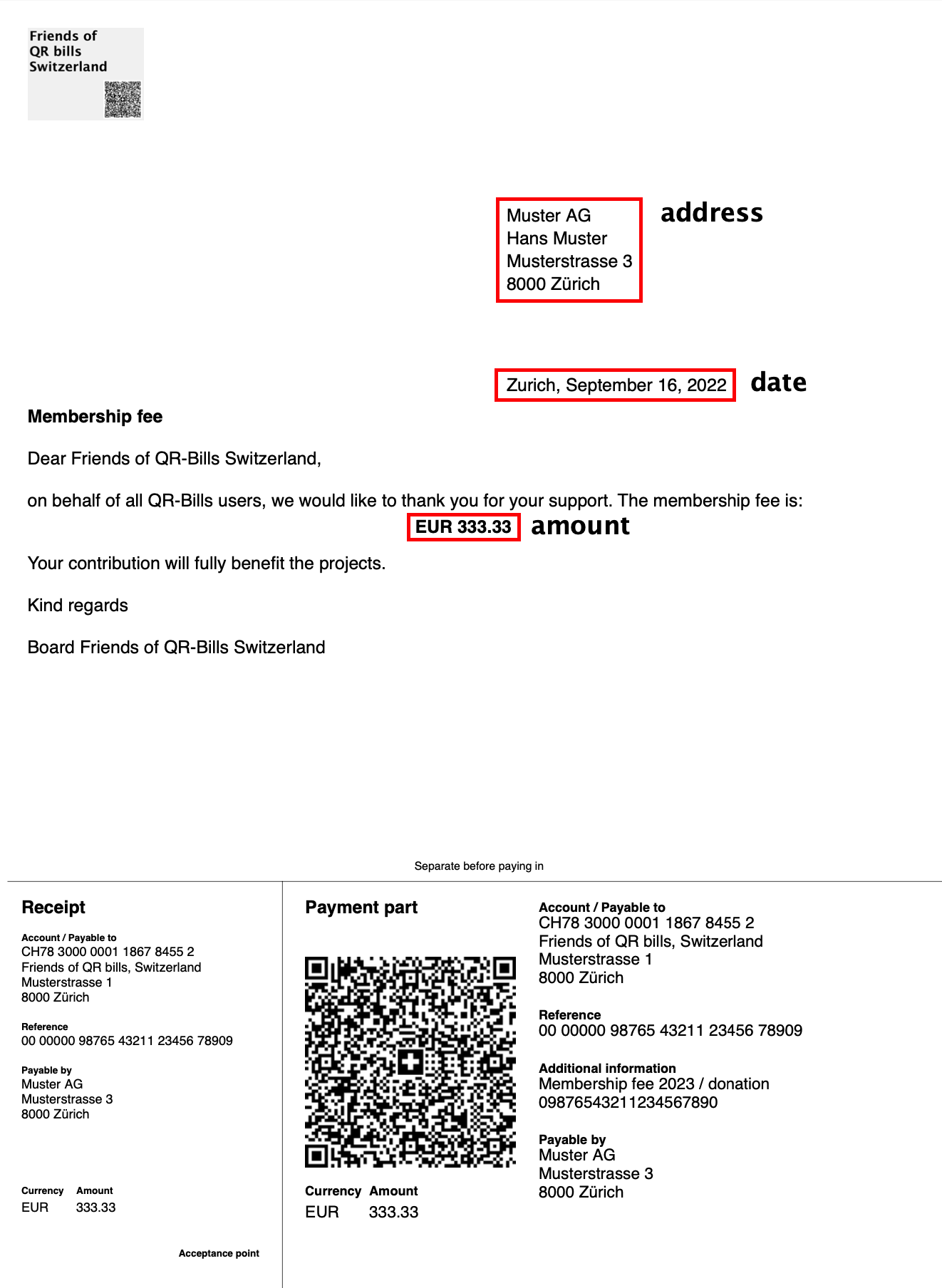
}The example gives you the following PDF:
This file is ignored if the configuration flag createPdf is false (do not create PDFs, just send mails).
It contains the template for the PDF to be created. The PDF template is taken as is, it is not processed by the code in any way. The template (that may contain several pages) is imported, and afterwards (optionally) the fields defined in PdfData.json are printed according to their positions. If the configuration flag printPaymentSlip is true then the payment slip is printed at the bottom of the last page (so leave this area empty on the last page of the template).
In addition to the file PdfTemplate.pdf for the default language, the code will look if there are files named PdfTemplate_[language].pdf, for example PdfTemplate_en.pdf for English.
See example in PdfData.json and the separate documentation in the directory examples.
This file is ignored if either of the configuration flags createPdf (do not create QR bills, just send mails) or printPaymentSlip (do not print print payment slip) is false.
This file is optional. If it's missing then the additional information on the payment slip is empty, except the configuration flag addRefToAddInfo is set. In the latter case the additional information contains just the reference (see also below).
If this file is present then it contains additional information to be printed on the QR bill (field "Zusätzliche Informationen"). It can contain up to 140 characters with several lines (separated by the control character \n) and optionally supports Multi-language.
If configured (see addRefToAddInfo in the configuration) then the code will add an additional line with the reference. In this case, pay attention to the maximum number of characters!
The surrounding key AdditionalInformation contains the following field:
| Name | Description | Range |
|---|---|---|
additionalInformation |
Additional information | multi-language |
without optional Multi-language support:
{
    "AdditionalInformation":
    {
        "additionalInformation": [
            {
                "language": "default",
                "text": "Mitgliederbeitrag 2099 / Spende"
            }
        ]
    }
}
with optional Multi-language support for "en" (defaultLanguage is "de"):
{
    "AdditionalInformation":
    {
        "additionalInformation": [
            {
                "language": "default",
                "text": "Mitgliederbeitrag 2099 / Spende"
            },
            {
                "language": "en",
                "text": "Membership fee 2099 / donation"
            }
        ]
    }
}This file is ignored if either of the configuration flags createPdf (do not create QR bills, just send mails) or printPaymentSlip (do not print print payment slip) are false.
It contains the creditor information to be printed on the QR bill (field "Konto / Zahlbar an").
The surrounding key CreditorInformation contains the following fields:
| Name | Description | Range | Example |
|---|---|---|---|
name |
name of the creditor | String | "Friends of QR-bills" |
addressLine1 |
address line 1, street | String | "Schöner Wohnen 123" |
addressLine2 |
address line 2, city | String | "8000 Zürich" |
country |
country code | String, "CH" or "LI" |
"CH" |
checkQrIban |
check for QR-IBAN, optional | boolean "true" = check, "false" or missing = do not check (= allow bank IBAN) |
"true" |
iban |
a QR-IBAN (old: orange payment slip) | QR-IBAN | "CH4431999123000889012" |
| or a bank IBAN (old: red payment slip) | IBAN | "CH5800791123000889012" |
|
besrId |
BESR ID, optional, missing or "NULL" for PostFinance, otherwise provided by your bank |
numeric (6-8 digits) | "NULL" or "12345678" |
ATTENTION: The QR-IBAN is not an ordinary IBAN! A QR-IBAN contains --starting with the 5th position-- a value in the range 30000..31999 (this is checked if checkQrIban is true). Only with a QR-IBAN, it is allowed to use the reference part on the payment slip.
If a bank IBAN is used, the payment reference ("Referenz") of the payment slip is not set; but it may still be added to the additional information ("Zusätzliche Informationen") of the payment slip by setting the configuration flag addRefToAddInfo to true.
{
    "CreditorInformation":
    {
        "name": "Friends of Kisimiri",
        "addressLine1": "Schöner Wohnen 123",
        "addressLine2": "8000 Zürich",
        "country": "CH",
        "checkQrIban": "true",
        "iban": "CH4431999123000889012",
        "besrId": "12345678"
    }
}
OR (no besrId, as field is missing)
{
    "CreditorInformation":
    {
        "name": "Friends of Kisimiri",
        "addressLine1": "Schöner Wohnen 123",
        "addressLine2": "8000 Zürich",
        "country": "CH",
        "checkQrIban": "true",
        "iban": "CH4431999123000889012"
    }
}
OR (iban is no QR-IBAN, checkQrIban is "false")
{
    "CreditorInformation":
    {
        "name": "Friends of Kisimiri",
        "addressLine1": "Schöner Wohnen 123",
        "addressLine2": "8000 Zürich",
        "country": "CH",
        "checkQrIban": "false",
        "iban": "CH5204835012345671000"
    }
}
OR (iban is no QR-IBAN, check missing)
{
    "CreditorInformation":
    {
        "name": "Friends of Kisimiri",
        "addressLine1": "Schöner Wohnen 123",
        "addressLine2": "8000 Zürich",
        "country": "CH",
        "iban": "CH5204835012345671000"
    }
}This file is mandatory and contains the data of the recipients.
The extension CSV does mean Comma Separated Values. That means that the field values in such a file are separated by the delimiter comma (,). But there are some applications that are able to export their proprietary data format into a CSV file, but they do not use a comma as separator but another character; Microsoft's Excel for example likes to use a semi-colon (;). Therefore this software tries to guess the delimiter by parsing the first two lines of the given CSV file and determining which separator of a given list occurs most often. The characters that are beeing looked for are comma (,), tabulator (\t), semi-colon (;), pipe (|) and colon (:).
The fields in a CSV file may be surrounded by quotation marks ("), but this is optional as long as the fields do not contain a delimiter. Only if a field contains a delimiter, it must be surrounded by quotation marks. In the following examples, the fields are separated by comma and not surrounded by quotation marks.
Attention: If the CSV file ends with an additional empty line, the import will fail!
The first line of this CSV file is the header line with keys (field names) that define the contents of the corresponding columns (fields) in the following lines. Depending on the use case, not all of the fields must be present. As the header line defines, which field is on which position, the order of the fields is not important.
Company,Salutation,FirstName,LastName,Street,BuildingNo,PostalCode,City,Country,Language,MailAddress,Reference,AmountThe fields in the following lines contain the following contents:
| Name | Description | Range | Example |
|---|---|---|---|
Company |
company | String | Muster AG |
Salutation |
salutation | String | Herr |
FirstName |
first name | String | Hans |
LastName |
last name | String | Muster |
Street |
street | String | Musterstrasse |
BuildingNo |
building number | String | 3 |
PostalCode |
postal code | String | 8000 |
City |
city | String | Zürich |
Country |
country | String | CH |
Language |
language | typically, one of the supported languages de, fr, it or en |
de |
MailAddress |
e-mail address | e-mail address or empty if not used (see usage below) | musterag@example.com |
Reference |
reference (eg. membership number) | numeric, maximum 27 digits minus the length of the BESR ID (see CreditorInformation.json) | 09876543211234567890 |
Amount |
amount | numeric, optional, may be missing (see usage below), if present must be >= 0.00 | 125.85 |
Greeting |
greeting | String | "Sehr geehrter Herr Muster" (surrounded by quotation marks as it contains blamks) |
Remark regarding language: If the language of a recipient is not one of the supported languages de, fr, it or en or the configured multi-language support does not support the language of a recipient, the configured defaultLanguage (see configuration) is taken for this recipient.
| Name(s) | Usage | mandatory / optional |
|---|---|---|
Company..City |
Used as address in the QR bill PDF (see Creation of the address lines in the PDF). | mandatory if the flag createPdf in the configuration is true |
Company, FirstName..Country |
Used as debtor ("Zahlbar durch") in the QR bill payment slip (see Creation of the debtor lines in the payment slip). | mandatory if the flag addDebtor in the configuration is true |
Language |
Used to control the language of the texts. | mandatory |
MailAddress |
Used for sending the e-mail. | mandatory if the flag sendMail in the configuration is true |
Reference |
Used as payment reference ("Referenz") in the QR bill payment slip (if the IBAN is a QR-IBAN); optionally appended to additional information ("Zusätzliche Informationen") of the QR bill payment slip. | mandatory if the flag printPaymentSlip in the configuration is true, but may be left empty ("") if the flags checkQrIban in CreditorInformation.json and addRefToAddInfo in the configuration are both false |
Amount |
Used as amount ("Betrag") in the QR bill PDF and payment slip | mandatory if printAmount in the configuration is "individualAmount" |
Greeting |
Used in the QR bill PDF | optional, if present then a position for the special entry greeting in PdfData.json must be present as well (otherwise nothing is printed) |
Remark: In general, a field may be left empty. But if some of the mandatory fields FirstName..Country are empty, it may lead to strange looking or even invalid QR bills (QR codes). The software does not check this!
Company is not empty then field Company is used; otherwise the field Salutation is used.FirstName, followed by a space character (' '), followed by the field LastName.Street, followed by a space character (' '), followed by the field BuildingNo.PostalCode, followed by a space character (' '), followed by the field City.Company is not empty then the field Company is used; otherwise the field FirstName and the field LastName are combined to one string (separated by a space character ' ', example Hans Muster).Street..Country are passed as-is to the QR bill payment slip engine.Company,Salutation,FirstName,LastName,Street,BuildingNo,PostalCode,City,Country,Language,MailAddress,Reference,Amount,Greeting
,Frau,Hanna,Muster,Musterstrasse,1,8000,Zürich,CH,de,hmuster@example.com,1234567890,222.90,"Liebe Frau Muster"
,,Han,Muster,Musterstrasse,2,8000,Zürich,CH,it,han.muster@example.com,0987654321,125.25,"Caro Han"
Muster AG,Herr,Hans,Muster,Musterstrasse,3,8000,Zürich,CH,en,musterag@example.com,09876543211234567890,100,"Dear Mr. Muster"
Muster GmbH,,c/o Hans,Muster (-Müsterli),Musterstrasse,4,8000,Zürich,CH,fr,mustergmbh@example.com,09876543211234567890,0.05,""Company,Salutation,FirstName,LastName,Street,BuildingNo,PostalCode,City,Country,Language,MailAddress
,Frau,Hanna,Muster,Musterstrasse,1,8000,Zürich,CH,de,hmuster@example.com
,,Han,Muster,Musterstrasse,2,8000,Zürich,CH,it,han.muster@example.com
Muster AG,Herr,Hans,Muster,Musterstrasse,3,8000,Zürich,CH,en,musterag@example.com
Muster GmbH,,c/o Hans,Muster (-Müsterli),Musterstrasse,4,8000,Zürich,CH,fr,mustergmbh@example.comPay attention to the lines 3 and 5: The commas at the end are mandatory!
Language,FirstName,LastName,Street,BuildingNo,PostalCode,City,Country,Company,Salutation
de,Hanna,Muster,Musterstrasse,1,8000,Zürich,CH,,Frau
it,Han,Muster,Musterstrasse,2,8000,Zürich,CH,,
en,Hans,Muster,Musterstrasse,3,8000,Zürich,CH,Muster AG,Herr
fr,c/o Hans,Muster (-Müsterli),Musterstrasse,4,8000,Zürich,CH,Muster GmbH,Language,MailAddress
de,hmuster@example.com
it,han.muster@example.com
en,musterag@example.com
fr,mustergmbh@example.comThis file has the same format as Recipients.csv, but has only one entry with a test recipient. The e-mail address of this entry is dynamically (but not persistently) set by the 'Test run' execution.
Remark: This file cannot be uploaded using the web page. It is provided as part of the delivery in the directory cfg/. You may change the contents of this file, but you must not delete it, as otherwise the 'Test run' execution will no longer work.
Company,Salutation,FirstName,LastName,Street,BuildingNo,PostalCode,City,Country,Language,MailAddress,Greeting
,Familie,Hans+Hanna,Muster,Musterstrasse,1,9999,Musterstadt,CH,de,muster@example.com,1234567890,55.55"Liebe Familie Muster"
Remark: The e-mail address muster@example.com is not used at all, see explanation above.
All output files are stored in the output folder below the profile directory (see Profile) except the status file and the log file (see below).
The created PDF files are stored in a folder inside of the output folder that carries the current date and time in the format YYYYMMDD-hhmmss (YYYY = year, MM = month, DD = day, hh = hour, mm = minute, ss = second), for example 20991231-235959.
The name of each PDF file has the format
qr-bill-[index]-[lastName]-[firstName]-[mailAddress].pdf
If the recipient has no mail address then the part "-[mailAddress]" is not appended.
| Part | Description | Example |
|---|---|---|
[index] |
index of the current record in the file Recipients.csv, starting with 0 (but index 0 is the header line, so the first recipient has the index 1) |
example 1 |
[lastName] |
last name of the current record in the file Recipients.csv |
example Muster |
[firstName] |
first name of the current record in the file Recipients.csv |
example Hans |
[mailAddress] |
e-mail address of the current record in the file Recipients.csv |
example muster@example.com |
Remarks:
maxRunsToKeep in the Environment defines how many runs are kept.With e-mail address:
qr-bill-1-Muster-Hans-muster@example.com.pdfWithout e-mail address:
qr-bill-1-Muster-Hans.pdfThe protocol is named qr-bills-protocol.csv is stored in the same folder inside of the output folder that contains the PDF files.
This protocol lists every processed item and contains the following fields:
| Index | Description |
|---|---|
0 |
index of the current record in the file Recipients.csv, starting with 1, see remark in PDF files |
1 |
last name of the current record in the file Recipients.csv |
2 |
first name of the current record in the file Recipients.csv |
3 |
e-mail address of the current record in the file Recipients.csv, empty if none has been provided |
4 |
true if PDF has been stored |
5 |
true if mail has been sent |
Remark:
The status file and the status tracking file are stored directly in the directory data. These files are used to display the status of the processing asynchronously on the web page.
Remark:
The log file is stored directly in the directory data and shows every action taken by the QR bill processor, especially important if some error occurs. Refer to the corresponding source code to understand the log entries.
The name of the log file consists of the prefix qr-bills_, followed by the current date (format YYYY = year, MM = month, DD = day), followed by the extension .log.
Remark: